What the record contains
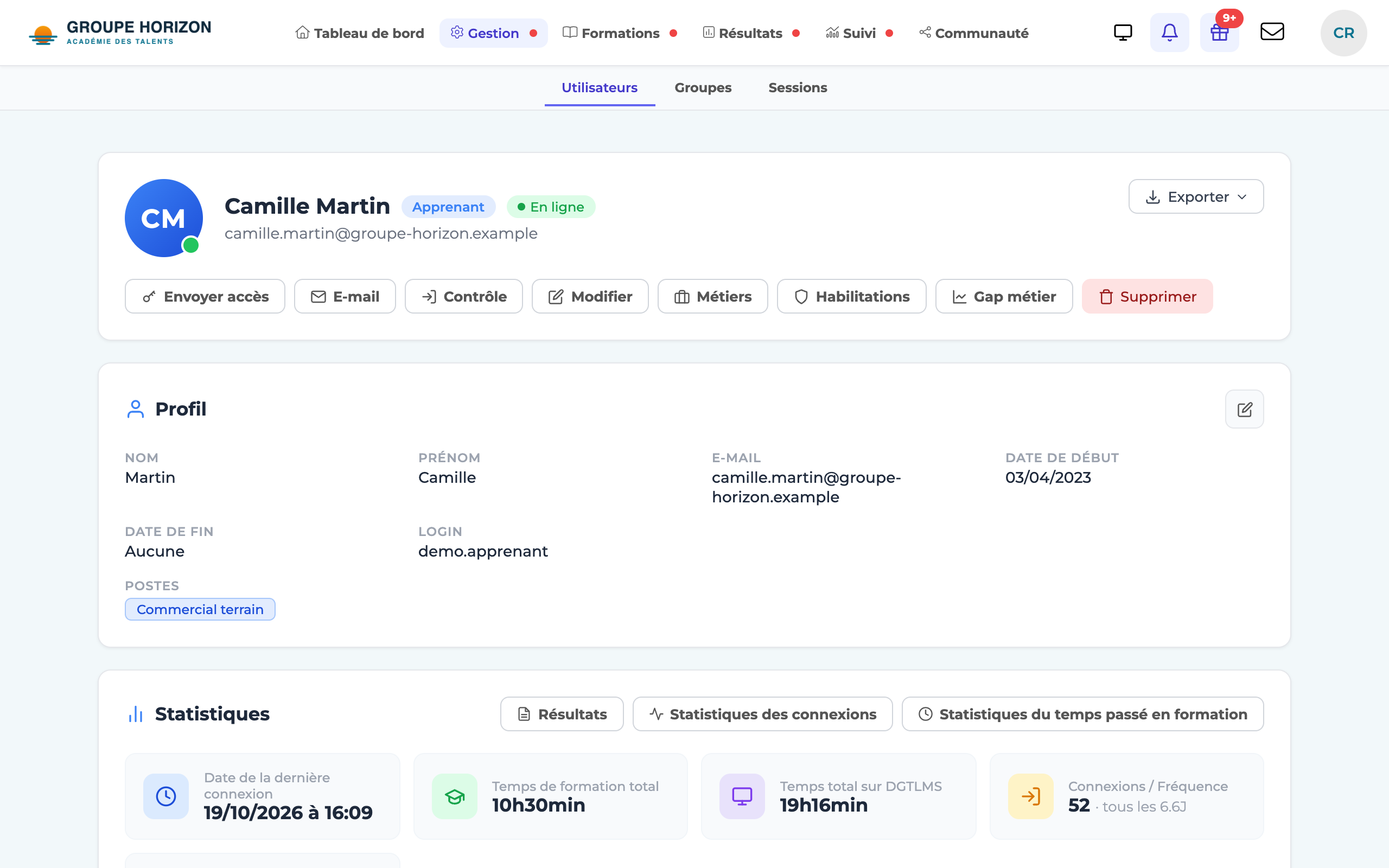
The account record gathers on a single page:
- Identity — first name, last name, photo, login, email address, start and end dates, department, plus your custom fields.
- Certificates — the candidate sheet, a certificate for all sessions, one for the active session, and one certificate per course taken.
- Statistics — number of logins, time spent, login frequency.
- Groups & sessions — the list of the user's groups and sessions; for a learner, each session shows their score and time spent.
Opening it
Open the account list
Users(or from a result, a group or a session).Click the user
their account record opens.
Available actions
Depending on your rights, the action bar offers:
- Edit — edit the account.
- Results — open the learner's detailed tracking.
- Export — in particular the training record for each of their courses, including those taken outside a session (see Produce a learner's training record).
- Control — log in "as" the user (for troubleshooting); this is recorded.
- Delete — delete the account (after confirmation).
- Skills — view their skills (if the module is enabled).
- An email link lets you write to the user directly.
- You can only act on accounts with a lower level than your own: an instructor cannot edit an administrator.
- The detail of attempts and answers is not shown here: it is in the Results tool (see the Tracking & reporting articles).